Universal Flight System
Albatross encompasses the entire airborne acquisition systems and all their components. This includes the hardware components such as cameras, triggering controller, tripod and screen, as well as all the software components including the acquisition controller, the user interface, backup utilities and spase upload.
The universal flight system, or UFS, specifically refers to the software components necessary for manned aircraft data capture. They will each be described in detail in the following pages.
Overview
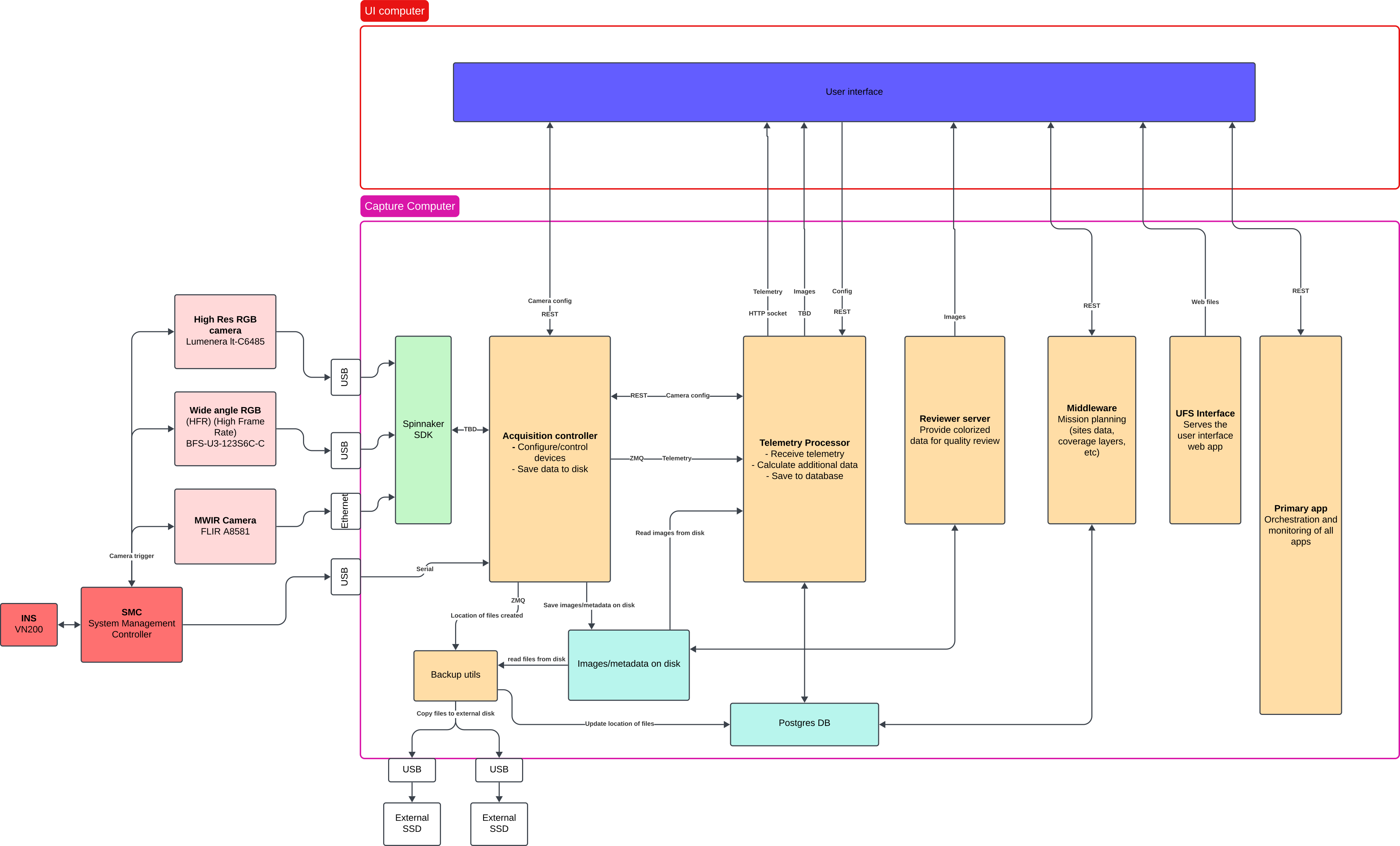
UFS consists seven custom software components. Dataflow starts at the acquisition controller which is responsible for sensor and controller interfacing. It configures and acquires the images and telemetry from the cameras and SMC.
The metadata generated by the acquisition controller is then passed to the telemetry processor which digests it to produce some higher level information for the pilot and operator interfaces.
Information about the file locations is also passed to the Backup Utility which is responsible for discovering available external storage drives and copying all image and metadata files to redundant external drives whenever possible.
Reviewer Server is a tool which lets the user interface query information about passes, their review status, and serves images to the front end for the operator to review. It is also responsible for storing the review status of said images.
Middleware is basically a crud application on top of the PosgreSQL database that stores all the site and recording information. It also serves some higher level and higher latency functions such as generating flight lines and coverage maps.
Primary App is responsible for orchestration and monitoring of the aforementioned systems. It is launched by systemd on system startup and is responsible for spawning the sub-processes that make up UFS. It allows control and monitoring of those subprocesses via a simple REST interface.
Lastly, the UFS Interface is a web app that serves as the main user interface for the system. It provides all the visibility and control surfaces needed to capture data efficiently using UFS. It is served by a nginx engine running on the onboard computer and connects to all the earlier mentioned systems.
Runtime environment
The various processes outlined above will interact together in several ways, some of those mechanism, such as ZMQ sockets
do require that both processes agree on what port to use. Some other elements, like the file storage location for the
acquisition controller, are also deserving of some flexibility. As such, those elements are not hard coded and instead
expect environment variables to be set. To make environment setup simpler for everyone, the use of a .env file is highly
recommended.
Every process will start by trying to load the ${HOME}/.env file and the variables within. Each process will then use
whatever environment variable they need out of said file. If one chooses not to use said .env file, they will be responsible
for ensuring the environment contains the necessary variables. Failure to do so will cause the various processes to crash
on launch.